 EML to PST Converter was designed with simplicity and user-friendliness in mind. Although the idea of transferring your complete email archive from one application to another may seem to be extremely complex, risky and time-consuming (simply put, a nightmare!) this software minimizes your involvement and makes the whole process as hassle-free and smooth as possible. Unlike many eml2pst competitors, this program fully supports attachments, files over 2 and even 4 gigs in size, correctly recognizes encodings and supports a record number of email formats, so no matter whether you are a PC user, a big fan of Macs or an open-minded resident of both of these worlds, this great tool will come in handy whenever you need to haul your mail from one format to another!
Hassle-Free and Easy to Use EML to PST Conversion
With EML to PST tool, conversion of your EML files to PST format is a easy 3-step process:
- Run email conversion utility.
- Specify the location of your EML files, location and file name of target PST file.
- Configure the program options if needed.
- Press Start button.
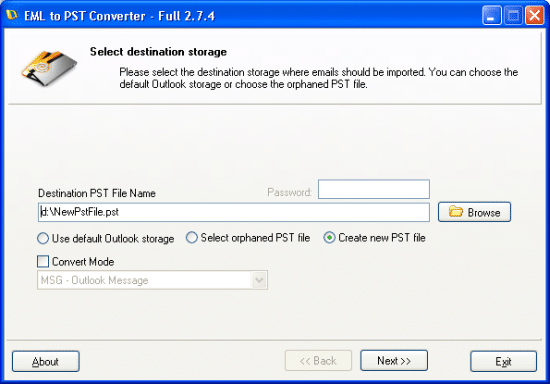
EML to PST Converter – user-friendly email conversion Wizard
EML to PST Converter features
EML to PST Converter is an ultimate email conversion and migration tool. However, its functionality extends far beyond working with the formats that gave it its name. The program can convert EML files into the MSG format and vice versa (in case you only need to convert specific emails instead of the whole archive), convert EML and MSG files into other popular formats, such as RTF, RTF, TXT, TNEF and HTML, convert .MBOX files into .EML and then to .PST and a whole lot more! Just take a look at the list of tasks this great software will help you with:
- Blazing-fast eml2pst conversion
- Import email files into Microsoft Office Outlook (import EML to PST)
- Import and convert file system directories to Outlook Folders
- Import eml files into Outlook, import msg files into Outlook (Outlook import eml)
- Convert eml to Outlook .pst personal storage files (even password protected!)
- A possibility to import archived email messages saved in other programs (Outlook import eml)
- Convert eml to pst, convert eml to msg, convert msg to pst
- Special import options:
recreation of the subfolders structure or import of all messages into a single folder - A possibility to create a new timestamped sub-folder for each import session
- A possibility to preserve the folder structure while importing files into MS Outlook
- A possibility to import eml files into:
the default Outlook PST profile, orphaned PST file or newly created PST file - A possibility to import msg files as messages in the RFC 822 format
- Import filters: select files of a specific size, exclude or include files with attachments, etc.
- Advanced message pre-processing options for emails saved on Unix and MacOS systems.
- The installation package includes a free mbox to eml converter
(Thunderbird to eml, convert mbox to pst, import mbox into Outlook) - Support of the Mac OS X .EMLX format
- Support of Unicode PST files, the program can create .pst files over 4 GB in size
- An integrated EML to MSG converter
- NEW FEATURE! Batch Mode for Importing .eml, .emlx and .msg files
- User-friendly and highly intuitive wizard-based interface
What else EML to PST Converter offers:
EML to PST Converter solves several crucial problems of any person switching to Outlook from another application or even another platform. It will help you arrange the migration of your emails from Outlook Express, Vista Mail, Thunderbird, The Bat, Eudora, IncrediMail, Entourage and others. It will be just what you need to import EML to Outlook and assemble a new PST file after its predecessor was damaged and processed by a data recovery tool that generated hundreds of EML files clogging your hard drive. It will also appear invaluable to Windows 7 newcomers who have just recently found out that the newest OS does not come with Windows Mail they used in Vista, thus making it impossible to start working with their emails right after the upgrade (they will have to find a way to import EML to PST).
The interface of EML to PST Converter is based on a step-by-step wizard that allows you to perform the necessary actions in a predefined order. This approach guarantees that virtually nothing can go wrong due to an incorrectly selected option or another haphazard action. Another great thing about EML to PST Converter is that you don’t need to be a programmer or a data recovery expert to get from point A to point B in the email universe.
To convert a single file (convert EML to PST, convert EML to MSG), or transfer a huge email archive, follow a series of single steps:
- Start the program
- Select the output PST file (choose between the default Outlook storage, an orphaned PST file or a completely new PST file)
- Select the source folder on your hard drive (it can be the root folder of the whole sub-folders structure)
- Configure additional conversion parameters and options
- Select the files to be converted and specify the destination folder in the selected Outlook data file
- Convert the files (import EML to PST, import EML to Outlook or convert one email format to another)
For your convenience, the illustrated step-by-step instruction is available on-line.
As you see, this is a simple and fairly straightforward EML to Outlook conversion process that requires a bare minimum of actions and special knowledge from your end.
Many users will definitely appreciate the ability to configure advanced parameters and adjust the process to meet their specific needs. You can apply a filter to choose files with or without attachments, filter files by size, specify the format of the output EML files, enable/disable EML preprocessing (for Unix and Mac platforms) and control the final location of the converted data.
Please note that the duration of the EML to PST conversion process depends on various factors, such as the performance of your computer, the total size of the files being converted and the options you select.
The demo version of the program has a limitation of one conversion per session, which you can remove by purchasing the full license. And if you are still in doubt about the program’s abilities, don’t hesitate to give it a test drive right away and run some quick EML to PST conversions!