How to Set Up a Windows Mail Export of Messages to MS Outlook
This article describes how to perform a Windows Mail export of messages from the pre-installed mail client on Windows Vista and how to transfer them through a Microsoft Office Outlook import (versions 2003 and 2007).
When switching to Windows 7, former Windows Vista users encounter the problem of how to do a Vista mail transfer and convert their Windows Mail (Vista Mail) message database. The problem of how to transfer mail from Vista Mail to Outlook is easy to resolve, as long as you have a Vista Mail backup copy of your mail messages and the EML to PST Converter program, which will help you to create a ready-made Personal Folders file.
Windows Mail export of messages from Windows Vista
To start with, make sure that you have a Vista Mail backup of the messages stored in your Windows Vista mail client. Windows Mail (the Vista mail client) stores messages in .eml files which are located in the directory C:\AppData\Local\Microsoft\Windows Mail.
If you are unable to find the files at that location, then check your mail program settings: Tools → Options → Advanced → Maintenance → Store Folder to find the Windows Vista mail folder with your messages.
To perform the remaining steps, you first need to copy the .eml files from this folder to a separate directory (before beginning the copy process the Windows Mail application should be closed and the WinMail.exe process should be terminated).
Carefully check your backup copy and make sure that the folders tree that has been created matches the structure that you use: for example, having your messages sorted by recipient/sender. After the backup copy is ready, you can start the MS Outlook import of e-mail messages with the help of the EML to PST Converter utility.
How to perform an MS Outlook import of mail messages
The EML to PST Converter allows you to merge your Windows Mail messages into a single MS Outlook .pst file, quickly converting Windows Mail to PST in just a few mouse clicks.
After the program has been launched, indicate the folder with the .eml files as well as the .pst file creation method you wish to use. It is possible to either create a new file or update an existing one. It is recommended to use the first option if you have not used MS Outlook up to this point (a Personal Folders file is automatically created when Outlook is first launched).
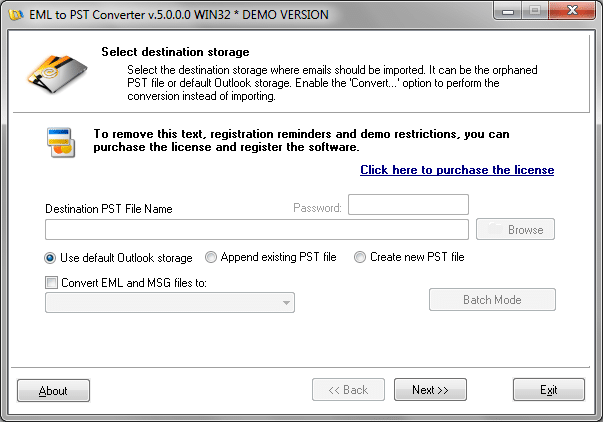
The second option is appropriate for more experienced users who are skilled at using MS Outlook. EML to PST Converter scans every folder in the indicated folders tree and displays a list of all the .eml messages that it has found.
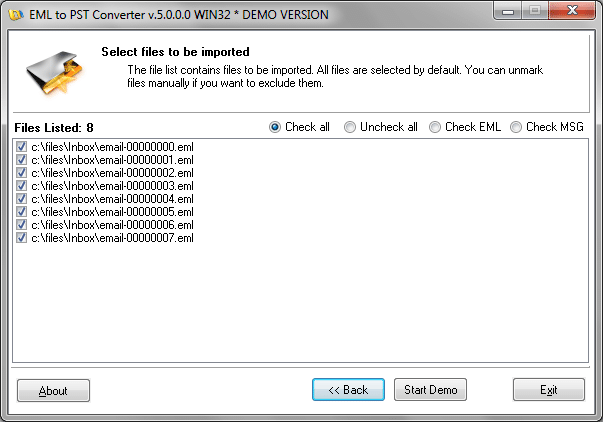
During the final step, the program will create (or update) a MS Outlook Personal Folders file. A unique feature of EML to PST Converter is that its analysis engine automatically recognizes the Windows directories structure used to save message files. When converting the messages into a .pst file, the directory structure is maintained, that is, e-mails and attachments will be moved during the Outlook import process into the corresponding folders created in Outlook. Precisely for this reason it is important to pay special attention to creating a Windows Vista Mail backup copy of your e-mail messages.