이 문서는 방법을 설명합니다 갱신 PST 이미 MS Outlook에서 존재하는 파일, 전자 메일 메시지를 변환하여 PST로 EML 태평양 표준시 변환 도구 EML의 도움에 추가.
업데이트 PST 파일을 기존
직장에서 집에서 - 우리는 종종 여러 메일 프로그램을 사용하여, 우리의 데스크톱 및 우리의 노트북에 - 그러나 때때로 하나의 이메일 클라이언트에서 우리의 전자 통신을 모두 결합 할 필요가있다. 사용하여이 작업을 수행 할 수 있습니다 MS 아웃룩, 별도을 만들어 개인 폴더 파일 (.태평양 표준시) 전자 대응 유형별 (예를 들어, 비즈니스 및 개인) 다음을 수행 PST 가져 오기 추가의 .태평양 표준시 파일. 그만큼 태평양 표준시 변환기 EML 유틸리티는 새를 만드는 데 도움이 될 것입니다 .태평양 표준시 전자 메일에서 파일에서 전송 애플 메일, 윈도우 메일, 아웃룩 익스프레스 또는 천둥새 그에 저장됩니다 .eml 형식, 다음 간단하게 처리 할 수있는 이메일 PST 변환.
PST 파일에 새 이메일 추가
그러나 시간이 지남에 따라이 필요로된다 갱신 PST 를 통해 새 전자 메일 메시지를 추가하여 파일 이메일 PST 변환. 이 기능은 또한 포함되어 있습니다 태평양 표준시 변환기 EML. 와 함께 작업을 시작하기 전에 .태평양 표준시 파일, 당신은 필요합니다 .에믈 전송 된 전자 메일 메시지의 복사, 예를 들어, ...에서 모질라 썬더 버드의 .MBOX 에서 갈 데이터베이스 PST로 EML.
다음 출시 태평양 표준시 변환기 EML 마법사의 첫 페이지에서 옵션을 선택 “기본값 사용 아웃룩 저장” (현재 업데이트 .태평양 표준시 아웃룩 설정에서 기본적으로 선택한 파일) 또는 “고아 PST 파일을 선택“(필요한를 선택 .태평양 표준시 대화 창에서 파일).
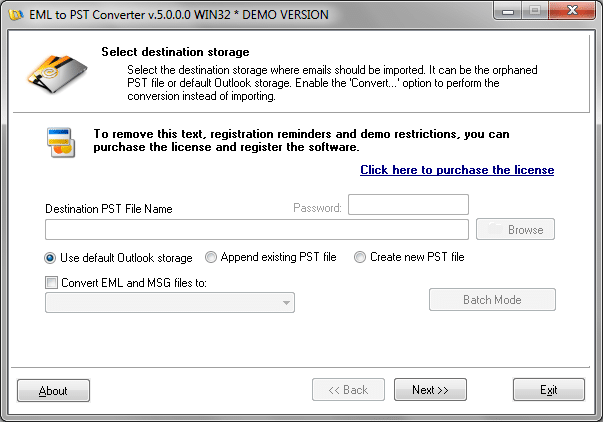
하나 개 이상의 개인 폴더 파일을 사용하는 경우 후자의 옵션은 권장. 경우] .태평양 표준시 당신이 선택한 파일은 암호로 보호되어, 당신은 암호 필드에이 암호를 입력해야합니다. 나중에, 지정 .에믈 의 입력 파일 및 대기 PST 변환 EML 끝까지 MS Outlook과 사용.
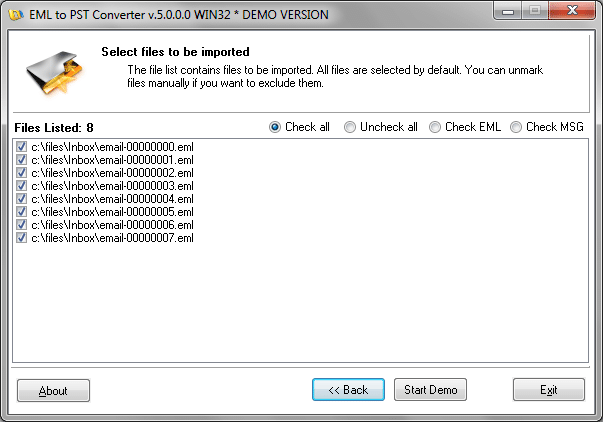
당신은 .eml 인 입력 파일이 들어있는 디렉토리 트리에 특별한주의를 기울여야한다. PST 변환기에 EML은 디렉토리 구조를 인식하고 주어진 형태에서 Outlook으로 전송. 따라서, Windows 디렉터리 이름은 Outlook에서 유사한 폴더의 이름과 같은 경우, 그런 다음 .에믈 입력 파일은 통해 이동합니다 PST 가져 오기 자동으로 해당 디렉토리에 배치됩니다.
또한 그와 유사하게 작동 할 수 있습니다 .MSG 파일, 당신이 결정할 여부 수입 MSG 파일 또는에 추가 .태평양 표준시 파일, 그들을 변환 PST에 MSG.