This article describes a solution for a typical problem where e-mail message text is displayed incorrectly after an Apple Mail-Outlook transfer, which can be solved with a preliminary EMLX convert of files using the eml to pst utility.
Typical problem of Mac OS encoding
A typical problem when converting messages from Unix or Mac OS X mail programs through an MS Outlook import is the corruption of e-mail message contents. For example, symbols may be lost in messages with HTML code and special symbols (such as →, &, ®, =, =amp; and others) may be replaced by their corresponding character codes. Similarly, HTML tags which are generally hidden from the user may be displayed in the message body. In most cases this is a result of usage of the .emlx format, which is used (like the analogous .eml format on Windows) for storing messages by some Unix and Mac OS mail clients, such as in the latest versions of Apple Mail (Mail.app). Since this problem is fairly widespread, the developers of EML to PST Converter provided a solution for it by adding EMLX converter features to the program.
Using EML to PST Converter
to solve the problem of incorrect display of e-mail message text and perform an EMLX conversion
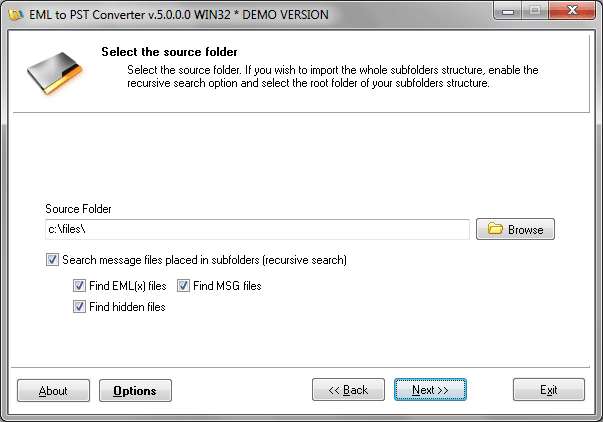
On the second page of the wizard (“Select the source folder“) select files with the .eml or .emlx extension (files which were previously exported from a Unix or Mac OS X mail client) as the input files for processing and conversion into .pst format. For an MS Outlook EML import of these e-mail message files that will work correctly without corrupting the contents, EML to PST Converter has a special feature in the Options menu to perform a preliminary EMLX convert into an Outlook-compatible format.
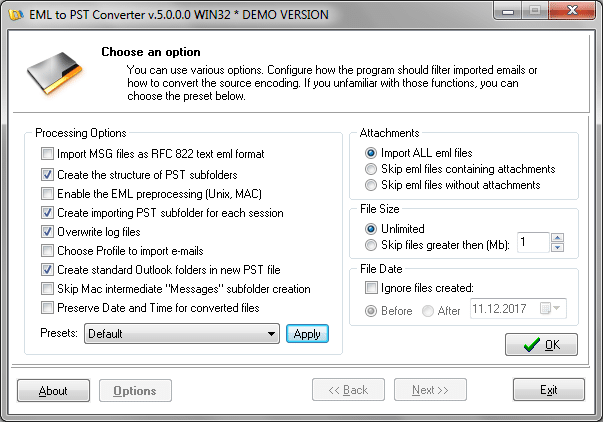
Encoding correction option
There is also a button for accessing this menu on the second page of the EML to PST wizard: the “Enable the EML preprocessing” option in the “Other Options” group. Thus, when working with mail messages that have been previously saved in a Unix or Mac OS mail client, make sure that this option is turned on.
Note that thanks to the use of an advanced preprocessing algorithm, additional conversion adds practically nothing to the total conversion time. For this reason, Outlook import of messages into a PST file will take only a few minutes of your time.