This article describes how to repair PST file damage and use EML to PST Converter to restore corrupt PST files (Personal Folders files).
Personal Folders files and Offline Folder files in MS Outlook can occasionally become damaged, resulting in a corrupt PST or OST file. It is possible to fix PST files that are damaged with the help of the EML to PST Converter utility together with special repair tools.
Extracting e-mail messages from a corrupt PST file
The first step is to extract mail messages from the corrupt PST file. Programs for this purpose include pst2eml, Recovery Toolbox for Outlook and Quick Recovery. All of these programs work in a similar way: generally, the user indicates the location of the corrupt PST or OST file and the directory where the extracted files are to be saved in .eml format (or .msg, if the program supports this).
Note that EML converter and repair programs often do not recognize the Outlook folder structure or save the extracted e-mail messages as separate files in the needed format, not taking into account which folder they are a part of. Here it is recommended to create the structure by hand, sorting the saved message files into folders located in the root directory.
EML to PST Converter features support for converting .eml messages into a .pst file while maintaining the folders tree in Outlook “as is”.
Identifying damaged .eml files with the EML to PST converter
and using the Repair PST File feature
On the first page of the wizard, select the option to create a new Personal Folders file by importing .eml messages through an EML-PST import, since the current corrupt PST file should not be used for updating.
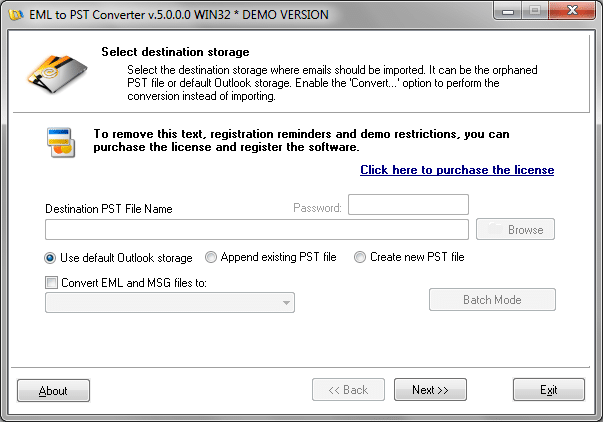
After the .pst file creation process is complete, check the event log to make sure that no errors occurred: a message processing error means that the given .eml file is damaged. In this case, repeat the EML-PST conversion of the file into .pst, repairing whenever possible the damaged e-mail messages or excluding them from processing.
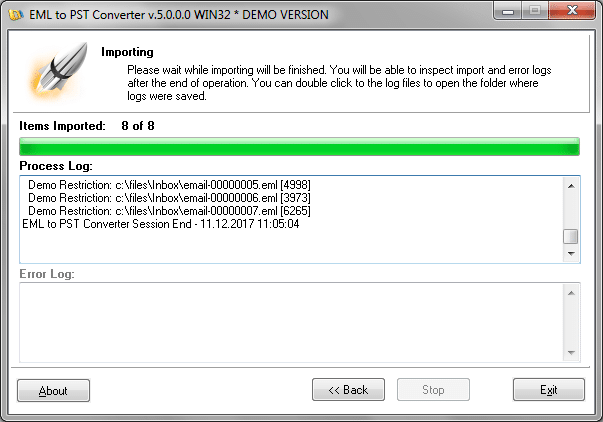
As a result of these efforts to repair PST files that were previously damaged, you will have a file suitable for PST import into MS Outlook. You can do this using the built-in features of the mail client after removing the corrupt PST file beforehand.