This article describes special features and options when creating files in EML to PST Converter to reduce PST size. The Outlook of early versions has 2Gb PST limit and that problem can be solved using importing function with enabled size limit option.
Problem of growing Outlook PST size
Users of MS Outlook versions 97 and 2002 often run up against restrictions that limit PST file size to a maximum of 2 GB. The latest versions of MS Outlook use a new PST file format, making the issue of restrictions that limit PST file size not as important as before.
The problem of reducing the size of Personal Folders files, however, will always be important, as their size increases as new messages are constantly added. In addition to this, PST files are a universal container that can be used to create a compact PST copy of a file as an PST archive. If you use a PST tool such as EML to PST Converter to work with .pst files, then you can reduce the size of a Personal Folders file during the creation stage.
How to reduce PST size when creating a file in EML to PST Converter
After selecting the path to the PST output file (“Select destination storage“), an Options button with a menu of additional settings will become accessible on the second page of the wizard (“Select source folder“).
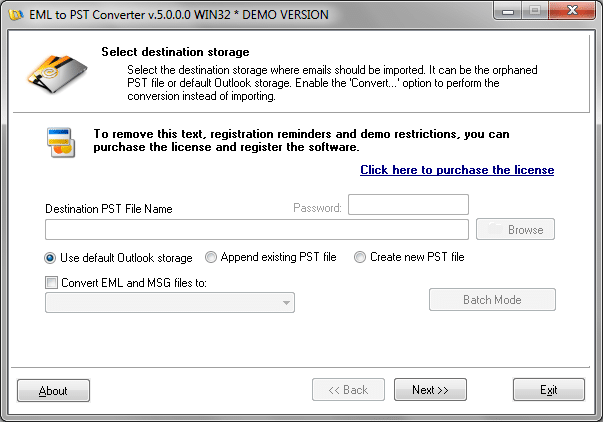
Choosing the right option
The program options are divided into groups. Of interest to us are the settings which can be used to reduce PST file size, which are given in the “Attachments” and “File size” groups. The settings under Attachments allow the user to specify whether or not to process e-mail messages containing attachments. This parameter is set by default to “Import ALL eml files“, that is, to transfer all incoming e-mails into the .pst file.
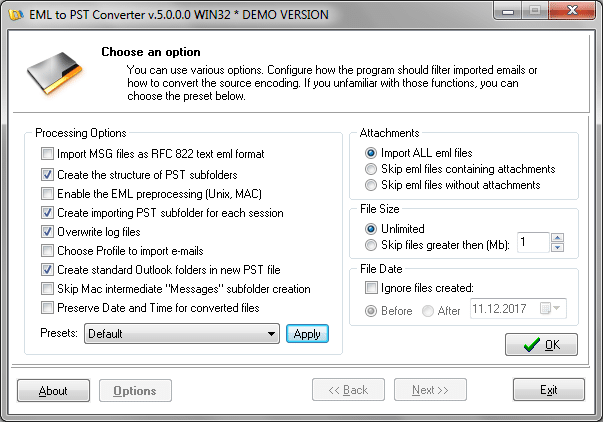
But, depending on your wishes, you can tell the program to process only messages containing attachments, or on the contrary, to process only messages not containing attachments. At the same time, the “File size” option allows limiting the size of imported files, for example, by excluding messages with large attachments.
By default, the program’s limit on the size of processed files is turned off, but if necessary, this option can be set to “Skip files“: files whose size exceeds the given value will not be imported into the resulting PST file.
Using these options in EML to PST Converter, it is quick and easy to reduce PST file size by selecting the messages that are most important to you (for example, those which contain only text). The new compact PST file, thanks to its small size, can now be saved as a PST archive in a separate directory, and activated in MS Outlook when necessary.